TP — Stylized Diorama (Unity / URP)
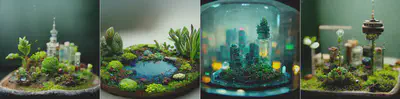
🎯 TP Objective
Create a diorama-style scene (a small miniature world) in Unity using URP, working on:
- visual composition (staging, readability, focal point),
- rendering (lighting, materials, post-processing),
- and an initial tech-art dimension (Shader Graph and/or VFX).
The final result must be visually coherent: even if you use external assets, you must harmonize their materials and the lighting atmosphere.
📌 Mandatory requirements (common core)
Your scene must include the following elements:
1) Composition / environment
- A readable diorama-style scene (miniature scale, clear framing, focal point).
- You may use free assets (Asset Store, Kenney, Poly Pizza, etc.),
but you must modify their materials to ensure visual coherence.
2) Lighting
- At least 3 distinct light sources, for example:
- Directional Light (sun),
- Spot Light (to highlight an object),
- Point Light (local ambiance).
- Expectation: clear intent (warm/cold atmosphere, contrasts, visual hierarchy).
3) Skybox / environment
- A Skybox (HDRI or procedural).
- Environment settings (Ambient Light, Reflections).
4) Visual effects
- At least 1 Particle System (Shuriken) integrated into the scene
(smoke, dust, snow, fireflies, sparks, bubbles…). - At least 1 URP post-processing Volume, including at minimum:
- Bloom or
- Color Adjustments.
5) Materials and shaders
- Use at least one standard URP Material (Lit).
- Create at least one custom Shader with Shader Graph, and apply it to an object in the scene.
🧩 Optional features
These options allow you to go further depending on your level and creativity.
A — Advanced Lighting (recommended)
- Baked or Mixed lighting.
- Use of Light Probes and/or Reflection Probes to improve rendering.
B — VFX Graph (or advanced particles)
- An effect using VFX Graph (if compatible with your Unity version),
or an advanced Particle System (collision, noise, trails, forces).
C — Cinematic (Timeline)
- A short cinematic of 5 to 10 seconds including:
- camera movement,
- reveal of the focal point,
- variation in lighting or effects.
D — In-editor modeling (ProBuilder)
- Create at least two decorative elements with ProBuilder
(base, stylized rock, arch, wall, bridge, platform…).
E — Simple interaction
Implement one basic interaction, for example:
- day/night toggle,
- color palette switch,
- enable/disable particles,
- opening a door,
- turning on a lantern.
F — Sound atmosphere
Add:
- an ambient soundscape (wind, forest, sea, factory, city…),
- at least one 3D spatialized sound effect.
🎨 Theme ideas (optional)
To avoid too many similar scenes, you can draw inspiration from these ideas:
- Miniature workshop (watchmaker, alchemist, tinkerer).
- Ruins in a bubble (temple, statues, vegetation).
- Miniature subway station (neon lights, smoke, reflections).
- Snowy cabin (snow + warm interior lighting).
- Stylized underwater scene (bubbles, simulated caustics, particles).
You may also propose your own theme, as long as it follows the diorama spirit.
📦 Expected deliverables
1) Unity Project
- Main scene named:
Diorama.unity - Functional project in URP.
2) README (1 page max)
To include in the project (Markdown or PDF):
- Title and theme of the diorama,
- Checklist of the 5 mandatory requirements,
- List of the 2 chosen options (with short justification),
- Sources of used assets (links + licenses).
3) Presentation image or video
- one fixed “beauty shot”,
- one short camera movement (pan, rotation, or tracking shot).
🧮 Indicative grading scheme
| Criterion | Weight |
|---|---|
| Composition & artistic direction | 30 % |
| Material coherence | 25 % |
| Lighting, Skybox & Post-process | 20 % |
| Shader Graph (quality + integration) | 15 % |
| Chosen options (relevance) | 10 % |
Bonus: overall polish (small animations, details, simple optimization).
📚 Useful resources
Free assets
- 3d textures: https://3dtextures.me
- Kenney (CC0): https://kenney.nl
- Poly Pizza: https://poly.pizza
- Poly Haven (HDRI Skyboxes): https://polyhaven.com
- Unity Asset Store (Top Free): https://assetstore.unity.com/top-assets/top-free
Shader Graph
- Unity Learn – Getting started:
https://learn.unity.com/tutorial/get-started-with-shader-graph - Shader examples:
https://www.youtube.com/playlist?list=PLsaDw3p1XpJiPp3v5gUyxuWkmUn3eB731
URP Post-processing
- Official documentation:
https://docs.unity3d.com/Manual/urp-integration-with-post-processing.html
Particles / VFX
- VFX Graph (Unity 6):
https://unity.com/resources/creating-advanced-vfx-unity6
Lighting (Baked, Probes)
- Reflection Probes:
https://docs.unity3d.com/Manual/class-ReflectionProbe.html
ProBuilder
- Documentation:
https://docs.unity3d.com/Packages/com.unity.probuilder
Timeline / Cinematic
- Official introduction:
https://unity.com/blog/games/first-guide-animation-in-unity