Cybersickness and Comfort in Virtual Reality
Introduction and key design factors
Étienne Peillard
IMT Atlantique — Lab-STICC
Why comfort matters in VR
Virtual reality can provide strong immersion and a compelling sense of presence.
However, VR can also induce discomfort in a significant proportion of users.
Typical symptoms include:
- nausea
- dizziness
- eye strain
- disorientation
- fatigue
Main idea
A VR application is not only judged by what it enables, but also by how comfortable it is to use.
What is cybersickness?
Cybersickness refers to a set of discomfort symptoms induced by exposure to virtual environments.
It is closely related to motion sickness, but with an important difference:
| Motion sickness | Cybersickness |
|---|---|
| caused by physical motion | often caused by visually simulated motion |
| example: boat, car | example: VR headset |
In VR
The user may see motion without physically moving.
Typical symptoms
Common symptoms include:
- Nausea
- Dizziness
- Eye strain
- Sweating
- Headache
- Disorientation
- General discomfort
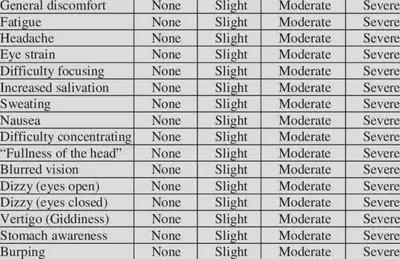
Questionnaires used in research
Simulator Sickness Questionnaire (SSQ)
One of the most widely used tools.
Measures three categories of symptoms:
- Nausea
- Oculomotor discomfort (eye strain, blurred vision)
- Disorientation
Participants rate the intensity of several symptoms after exposure.
Main explanation: sensory conflict
The most common explanation is the sensory conflict theory.
The brain combines information from:
- the visual system
- the vestibular system (inner ear)
- proprioception
Problem in VR
- The eyes may signal motion.
- The vestibular system may signal no motion.
This mismatch can produce discomfort.
Other complementary explanations
Postural instability
Cybersickness may also appear when users cannot easily stabilize their posture in response to the virtual scene.
Sensorimotor inconsistency
Discomfort can emerge when the environment behaves in ways that do not match the user’s action-perception expectations.
System disconfort
The prolonged use of a VR system can cause physical discomfort due to factors such as:
- headset weight
- heat
- pressure on the face
Important takeaway
Cybersickness is not caused by a single factor. It usually results from a combination of perceptual, motor, and technical issues.
Technical factors
Several technical parameters strongly affect comfort:
- Low frame rate
- High latency
- Tracking instability or jitter
- Incorrect camera updates
- Visual stutter
Why it matters
The visual scene should react to the user’s head and body movements in a way that is:
- fast
- stable
- predictable
Motion and locomotion factors
Locomotion design is one of the strongest comfort factors in VR.
| Often more discomfort | Often more comfortable |
|---|---|
| continuous joystick locomotion | teleportation |
| continuous rotation | snap turning |
| abrupt acceleration | smooth acceleration/deceleration |
| camera motion not initiated by the user | user-controlled motion |
Field of view and visual mitigation
Peripheral visual motion can strongly contribute to discomfort.
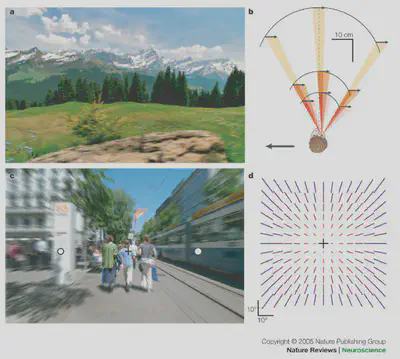
A common mitigation strategy
Dynamic FOV reduction during movement:
- reduce peripheral motion
- keep central vision available
- restore full field of view when the user stops moving
This is sometimes called:
- tunneling
- vignette

Spatial and perceptual consistency
Comfort is also influenced by how coherent the virtual world feels.
Potential issues include:
- incorrect world scale
- wrong camera height
- tilted horizon
- camera lag
- head bobbing
- artificial sway or roll
Key idea
If the VR system violates basic perceptual expectations, discomfort is more likely.
Design guidelines for comfort
Common recommendations for comfortable VR design include:
- avoid abrupt acceleration
- limit continuous artificial rotation
- maintain a stable horizon
- preserve correct scale and height
- provide stable visual references
- reduce peripheral motion during locomotion
- prioritize technical stability and low latency
There is no universal solution
A design choice may help some users and disturb others.
Link with today’s practical session
In the TP, you will:
- measure a baseline condition
- implement at least three independent comfort-related features
- test them with participants
- compare the results across groups
- derive design guidelines from the class dataset
Goal
Understand comfort in VR not only as a theory, but as a design and engineering problem.